Witaj w świecie Grymuar
Klasyczna, wymagająca przygoda Metin2, w której rozwój postaci, handel i współpraca z innymi graczami znów mają prawdziwe znaczenie.
A classic and demanding Metin2 adventure where character progression, trading, and cooperation with other players truly matter again.

Wkraczasz do świata Grymuar miejsca tworzonego na bazie plików MT2009, gdzie Metin ponownie wymaga cierpliwości, współpracy i determinacji.
To serwer w klimacie dawnych lat, inspirowany rozgrywką z okolic 2010 roku, ale w nieco przystępniejszej i przyjemniejszej wersji. Bez klasycznego Pay2Win i bez typowego ItemShopu Smocze Monety zdobywasz poprzez aktywność w grze, konkursy oraz ranking tygodniowy, dzięki czemu każde osiągnięcie ma realną wartość.
Klasyczna rozgrywka została wzbogacona o funkcje Quality of Life na miarę 2026 roku, ale bez niszczenia balansu i starego klimatu Metina. Tutaj nadal liczy się czas, strategia, współpraca gildii i zaangażowanie gracza.
Grymuar nie celuje w masowy, komercyjny projekt celem jest aktywna społeczność, rywalizacja 2/3 gildii i dobra zabawa w klimacie starego Metina.
Powodzenia — łatwo nie będzie, ale właśnie o to chodzi. ⚔️
Step into the world of Grymuar — a place built on the foundations of the MT2009 files, where Metin once again requires patience, teamwork and determination.
This is a server inspired by the atmosphere of the old days and the gameplay of around 2010, but presented in a slightly more accessible and enjoyable form. There is no traditional Pay2Win and no typical Item Shop. Dragon Coins can be earned through in-game activity, contests and the weekly ranking, meaning that every achievement has real value.
The classic gameplay has been enhanced with modern Quality of Life features fit for 2026, without ruining the balance or the nostalgic atmosphere of old-school Metin. Time, strategy, guild cooperation and player dedication still truly matter here.
Grymuar is not intended to become a massive commercial project. Our goal is to build an active community, create healthy competition between two or three guilds and simply enjoy the atmosphere of classic Metin together.
Good luck — it will not be easy, but that is exactly the point. ⚔️
Maksymalny poziom: 99
Liczba kanałów: 4
Dostępne postacie:


Królestwa:


Maximum Level: 99
Number of Channels: 4
Available Characters:
Kingdoms:
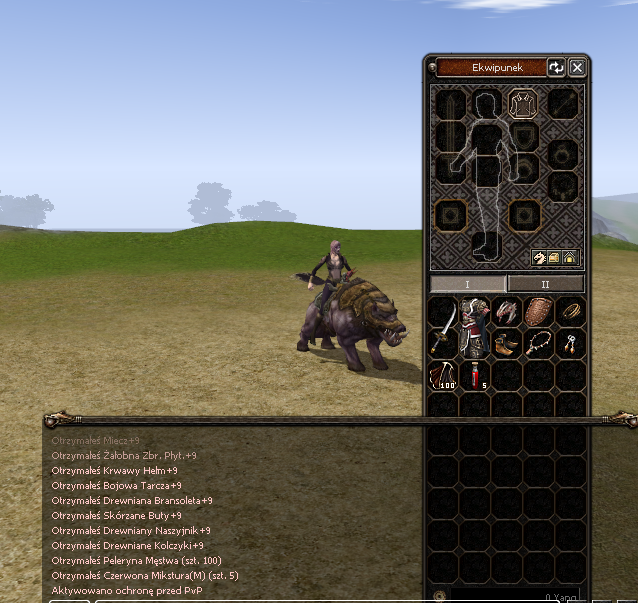
Ekwipunek na start gry:
- Młody Dzik (3 dni)
- 5x Czerwona Mikstura
- Buty Wiatru (7 dni)
Dodatkowo u Uriela możecie odebrać Pakiet Powitalny, który zapewnia VIP na 30 dni!
Dzięki temu od samego początku otrzymujecie wszystko, czego potrzebujecie, aby wygodnie rozpocząć swoją przygodę na serwerze.
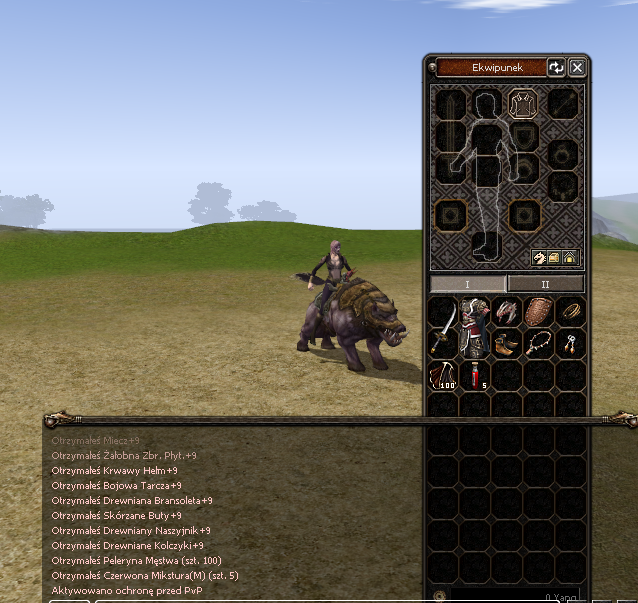
Starting Equipment:
- Young Boar (3 Days)
- 5x Red Potion
- Shoes of Wind (7 Days)
You can also claim a Welcome Package from Uriel, which grants you 30 Days of VIP!
This gives you everything you need to start your adventure on the server comfortably from day one.
⚔️ BALANS KLAS I UMIEJĘTNOŚCI
Każda profesja otrzymała indywidualne zmiany poprawiające komfort rozgrywki oraz jej możliwości w PvM.
Wybrane umiejętności zostały również rozbudowane o nowe efekty i mechaniki.
⚔️ WOJOWNIK BODY
🔥 Berserk
Umiejętność nie zwiększa już otrzymywanych obrażeń.
Wojownik może korzystać z pełnej szybkości ataku bez dodatkowej kary defensywnej.
🛡️ WOJOWNIK MENTAL
🛡️ Silne Ciało
Nie zmniejsza już prędkości ruchu.
Zapewnia dodatkową Wartość Ataku PvM.
Bonus skaluje się wraz z poziomem umiejętności oraz Siłą postaci.
🗡️ NINJA DAGGER
🗡️ Atak z konia
Podczas walki sztyletami z konia postać korzysta z animacji ataku mieczem.
💥 Zasadzka
Nakłada efekt Żądzy Krwi.
Efekt zwiększa Wartość Ataku.
Żądza Krwi może kumulować się maksymalnie 2 razy.
🌑 Krycie Się
Umiejętność aktywuje się natychmiastowo.
Jej użycie nie zatrzymuje poruszającej się postaci.
🏹 NINJA ARCHER
🔥 Ognista Strzała
Może podpalić przeciwników.
Może również obszarowo ogłuszyć pobliskie cele.
⚡ Iskra
Umiejętność Deszcz Strzał została zastąpiona nową umiejętnością — Iskra.
🏹 Ataki podstawowe
Podstawowe ataki mogą trafić jednocześnie do 3 przeciwników.
Rozwinięte Combo zwiększa liczbę trafianych celów do 5.
🐎 Walka z konia
Podczas atakowania Bossów oraz Kamieni Metin wystrzeliwany jest dodatkowy pocisk.
Dodatkowy pocisk zadaje 50% obrażeń podstawowego ataku.
🔮 SURA WP
🗡️ Czarowane Ostrze
Maksymalna kradzież
⚔️ CLASS & SKILL BALANCE
Each class has received individual changes designed to improve gameplay comfort and PvM performance.
Selected skills have also been expanded with new effects and mechanics.
⚔️ BODY WARRIOR
🔥 Berserk
The skill no longer increases damage taken.
Warriors can benefit from the full attack speed bonus without an additional defensive penalty.
🛡️ MENTAL WARRIOR
🛡️ Strong Body
No longer reduces movement speed.
Grants additional PvM Attack Value.
The bonus scales with the skill level and the character's Strength.
🗡️ DAGGER NINJA
🗡️ Mounted Attacks
Dagger attacks performed while mounted use the sword attack animation.
💥 Ambush
Applies the Bloodlust effect.
Bloodlust increases Attack Value.
The effect can stack up to 2 times.
🌑 Stealth
Activates instantly.
Using the skill no longer stops the character's movement.
🏹 ARCHER NINJA
🔥 Fire Arrow
Can set enemies on fire.
It can also stun nearby targets in an area.
⚡ Spark
Arrow Shower has been replaced with a new skill called Spark.
🏹 Basic Attacks
Basic attacks can hit up to 3 targets at once.
Upgraded Combo increases the number of targets hit to 5.
🐎 Mounted Combat
When attacking Bosses or Metin Stones, an additional projectile is fired.
The extra projectile deals 50% of the basic attack damage.
🔮 WEAPON SURA
🗡️ Enchanted Blade
Maximum life steal at Perfect Master is limited to 10%.
The skill now provides higher Attack Value at earlier stages of development.
🔥 BLACK MAGIC SURA
🔥 Flame Spirit
Attacks the target currently selected by the player.
This makes target control during combat more reliable.
🌑 Dark Protection
Grants additional PvM Attack Value.
The bonus scales with the skill level and Intelligence.
🐉 DRAGON SHAMAN
🐉 Dragon's Roar
Applies the Dragon's Wrath effect.
The effect increases the character's Attack Value.
🪭 Mounted Fan Attacks
Fan attacks performed while mounted use the sword attack animation.
✨ Buffs
Buffs used on other players retain their full effectiveness.
Buffs cast on yourself provide additional PvM Attack Value.
The bonus scales with the skill level and Intelligence.
✨ HEALING SHAMAN
⚔️ Attack Up
When cast on yourself, the skill provides a stronger effect.
The bonus scales with the skill level and Intelligence.
💚 Heal
Creates an additional protective shield.
The shield absorbs a portion of the damage dealt by monsters.
✨ Buffs
Buffs used on other players retain their standard effectiveness.
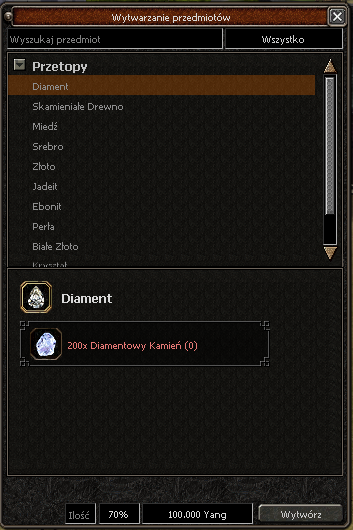
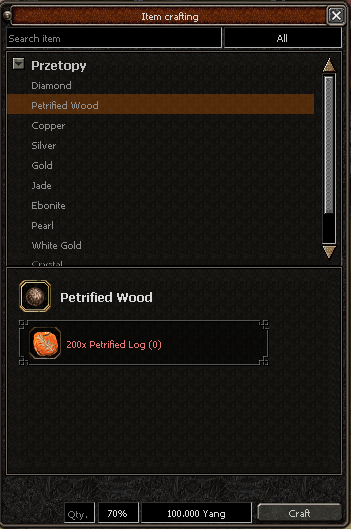
Przetopy tworzy się u Kowala.
Dozorca
Materiały Rzemieślnicze
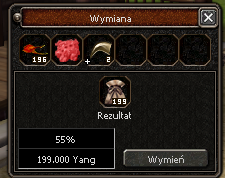
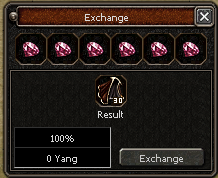
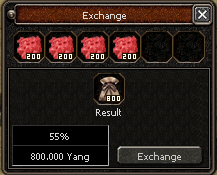
U Dozorcy możesz wymienić wybrane przedmioty ulepszające na Materiały Rzemieślnicze. To cenny surowiec wykorzystywany do rozbudowy ekwipunku oraz specjalnych zakupów.
Powiększanie Sakw Konia
Materiały Rzemieślnicze pozwalają powiększyć sakwy konia, zwiększając ich pojemność i zapewniając dodatkowe miejsce na przedmioty podczas rozgrywki.
Kamienie Duszy
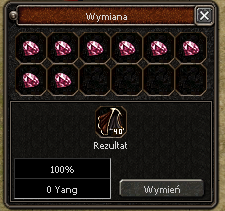
Niepotrzebne Kamienie Duszy możesz wymienić u Dozorcy na Peleryny Męstwa, przydatne podczas szybkiego zbierania grup potworów i efektywnego expienia.
Refined Ores can be crafted at the Blacksmith.
Storage Keeper
Crafting Materials
At the Storage Keeper, you can exchange selected upgrade items for Crafting Materials. This valuable resource is used to expand your inventory and for special purchases.
Expanding Horse Saddlebags
Crafting Materials can be used to expand your horse saddlebags, increasing their capacity and giving you additional space for items during gameplay.
Soul Stones
Unused Soul Stones can be exchanged at the Storage Keeper for Bravery Capes, useful for quickly gathering groups of monsters and making levelling more efficient.
Podstawy zielarstwa
Zielarstwo staje się dostępne po osiągnięciu 20 poziomu i rozpoczęciu specjalnej misji u Beak-Go.
Pierwszym wyzwaniem jest zdobycie 10 Korzeni Gango, gracz może je kupić od innych graczy lub samodzielnie odnaleźć na mapie i zebrać używając nożyka zielarskiego. Samodzielny zbiór jest trudniejszy, ale pozwala poznać podstawy zielarstwa i daje większą satysfakcję. W czasie zbioru nie wolno wykonywać innych czynności – każde zakłócenie przerywa proces. Dzięki temu zadaniu gracz uczy się cierpliwości oraz obsługi narzędzia, które w przyszłości stanie się kluczowe we wzmocnieniu postaci.
Nożyk zielarza
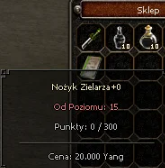
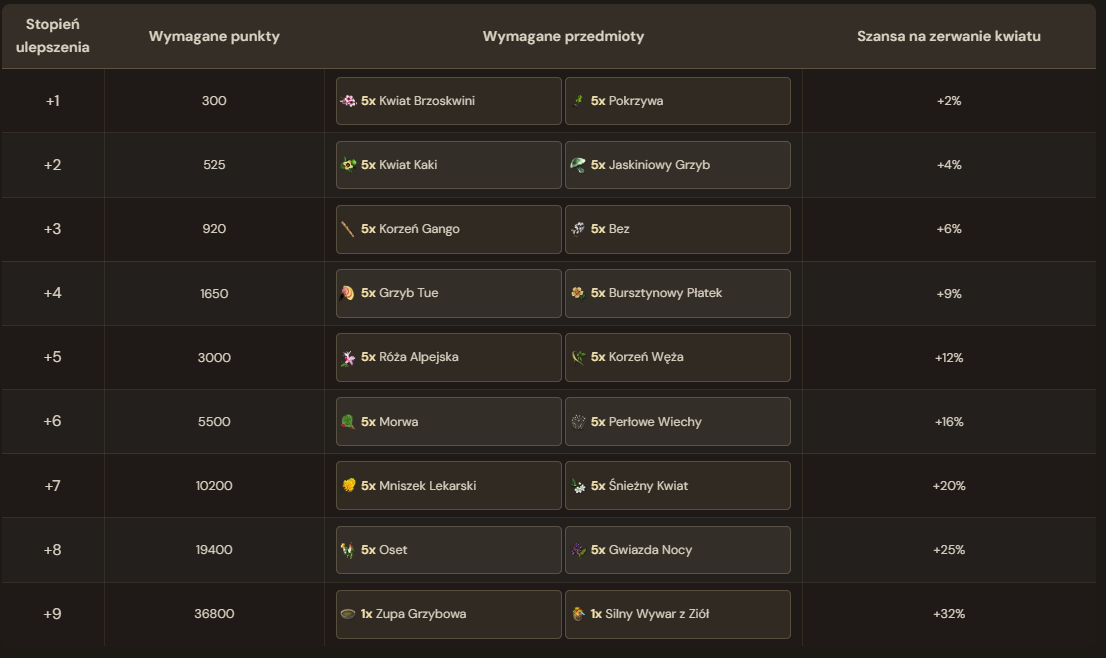
Nożyk zielarza to specjalne narzędzie kupowane u Beak-Go, przeznaczone do zbierania roślin. Jego skuteczność można zwiększać poprzez ulepszanie – od +0 do +9.
Każdy poziom ulepszenia wymaga zdobycia odpowiedniej liczby punktów, które otrzymuje się właśnie za zbieranie roślin. Dzięki temu nożyk staje się coraz bardziej wydajny i ułatwia pozyskiwanie surowców zielarskich.
Informacje o recepturach
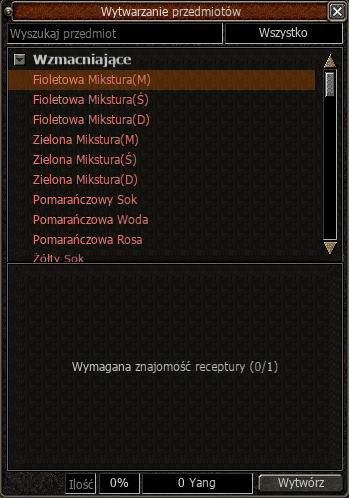
W systemie zielarstwa dostępne są różne mikstury, m.in. autopoty, eliksiry przyspieszające atak i ruch, mikstury zwiększające zdobywanie doświadczenia oraz wywary skracające czas nauki umiejętności, które są świetną alternatywą dla Rad pustelnika bądź zwojów egzorcyzmu.
Aby je wytworzyć, gracz musi najpierw poznać odpowiednią recepturę, którą można zdobyć poprzez zakup od innych graczy, nagrody za questy lub drop z bossów i minibossów.
Dopiero po nauczeniu się receptury możliwe jest przygotowanie danej mikstury.
Herbalism Basics
Herbalism becomes available after reaching level 20 and starting a special quest given by Baek-Go.
The first challenge is to obtain 10 Gango Roots. The player can either purchase them from other players or find them on the map and gather them using the Herbalist’s Knife.
Gathering the roots yourself is more difficult, but it allows you to learn the basics of Herbalism and makes the process more rewarding. While gathering, the player cannot perform any other actions — any interruption will stop the gathering process.
This quest teaches the player patience and how to properly use the tool that will later become an important part of strengthening their character.
Herbalist’s Knife
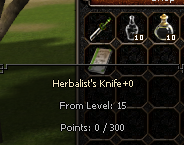
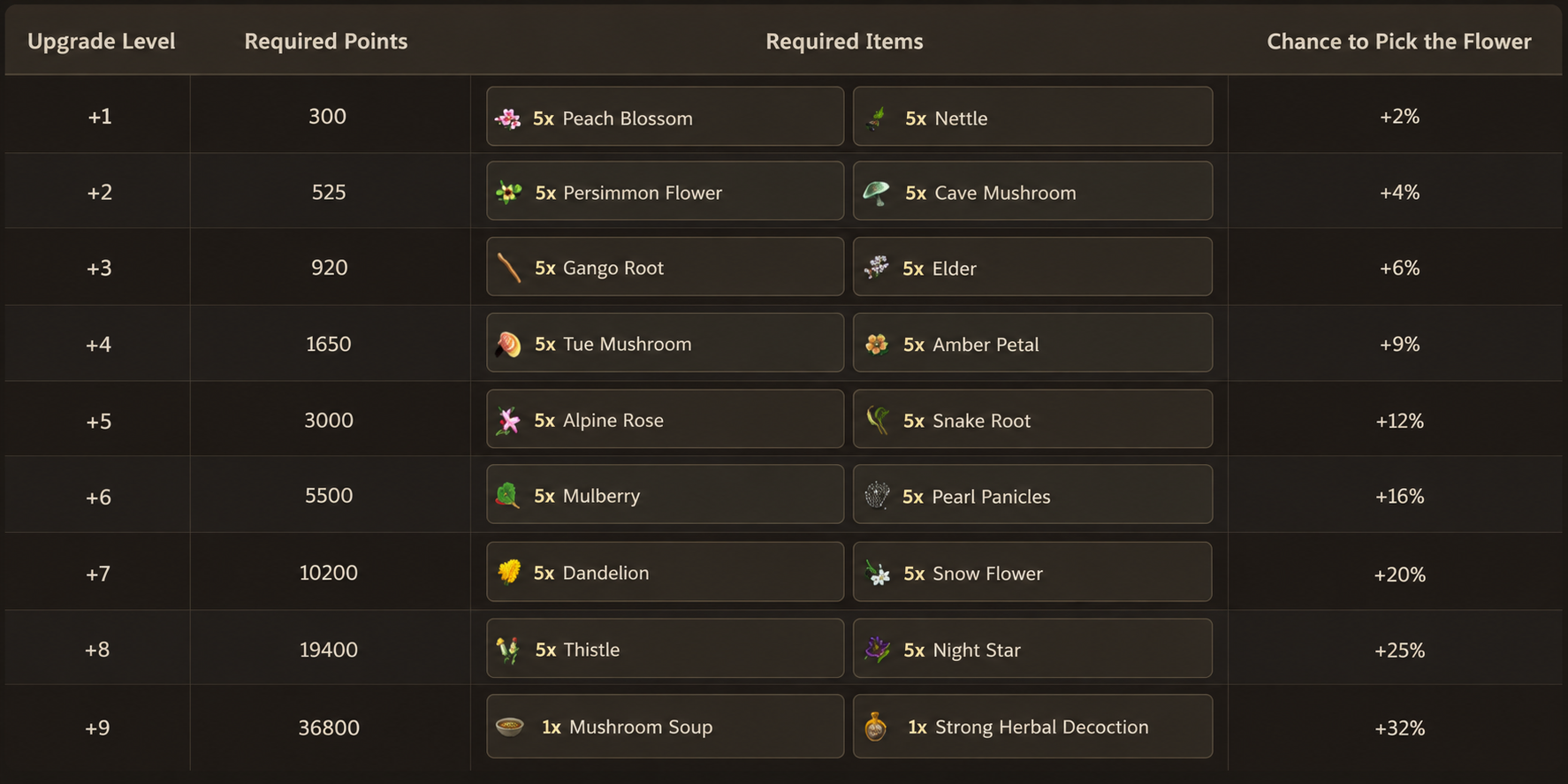
The Herbalist’s Knife is a special tool purchased from Baek-Go, designed for gathering plants. Its effectiveness can be increased through upgrades, ranging from +0 to +9.
Each upgrade level requires a certain number of points, which are earned by gathering plants. As the knife is upgraded, it becomes increasingly efficient and makes collecting herbal materials easier.
Recipe Information
The Herbalism System features a variety of potions, including Auto Potions, elixirs that increase Attack Speed and Movement Speed, potions that boost EXP gain, as well as brews that reduce skill training time, making them a great alternative to Hermit’s Advice and Exorcism Scrolls.
Before crafting any potion, the player must first learn the corresponding recipe. Recipes can be obtained by purchasing them from other players, completing quests, or as drops from bosses and mini-bosses.
Only after learning the recipe will the player be able to craft the selected potion.
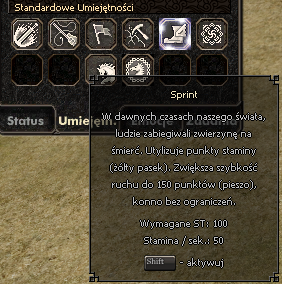
System Sprintu bazuje na mechanice staminy, dzięki której nasza postać posiada pasek energii, który po pewnym czasie się wyczerpuje.
Podstawy Sprintu
Dzięki systemowi sprintu poruszanie się w początkowych fazach gry będzie skuteczniejsze, a to wszystko bez strat umiejętności Archera i szamana. Sprint włączyć można za pomocą klawisza Shift.
Limity Prędkości
Sprint nie może dać powyżej 150 prędkości ruchu na postaci. Oznacza to, że jeżeli bazowo mamy 130 punktów szybkości, to sprint przyspieszy nam tylko o 20 punktów ruchu.
Sytuacja jest inna, gdy poruszamy się konno, gdyż nie ma tam limitu. Sprint konno pozwala poruszać się nam powyżej limitu ruchu na postaci wynoszącego 200 punktów.
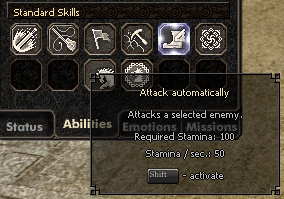
The Sprint System is based on a stamina mechanic, giving your character an energy bar that gradually depletes while sprinting.
Sprint Basics
Thanks to the Sprint System, moving around during the early stages of the game becomes much faster and more convenient, without reducing the usefulness of the Archer and Shaman classes.
Sprint can be activated by holding the Shift key.
Movement Speed Limits
Sprint cannot increase your character’s Movement Speed above 150.
This means that if your character already has 130 Movement Speed, sprinting will only provide an additional 20 points.
The situation is different while riding a horse, as there is no such limit. Sprinting on horseback allows you to exceed the standard character Movement Speed limit of 200 points.
System Sklepów Offline pozwala graczom na kontynuowanie handlu nawet wtedy, gdy nie są zalogowani w grze. To wygodne rozwiązanie dla graczy, którzy chcą sprzedawać swoje przedmioty przez dłuższy czas.
Podstawy Sklepów
W ekwipunku widoczne są trzy przyciski, jeden z nich to okno sklepu. Na początku otrzymamy informacje, że nie mamy otwartego sklepu.
Wymagania
Aby móc sklep otworzyć należy skorzystać z Tobołu, który dostępny jest u Handlarki w M1 bądź M2.
Odblokowywanie Slotów
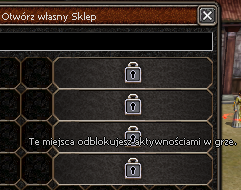
Część zablokowanych okienek możemy odblokować za pomocą Drewnianego Klucza a część za pomocą aktywnego pakietu VIP.
Sposoby Wystawienia Sklepu
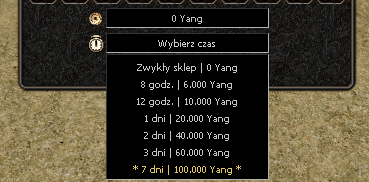
Sklep można wystawić na dwa sposoby:
Standardowy: Umiejscowiony przy naszej postaci w tobołku. W tym czasie postać jest nieaktywna i służy jako sklep.
Offline: Niezależny od statusu zalogowania. Postać może zostać wylogowana bądź korzystać z innych aktywności w grze. Jednak usługa ta jest płatna zależnie od czasu wystawienia.
Zarządzanie Sklepem
Po sprzedaży przedmiotu otrzymamy informacje, który przedmiot został sprzedany. Zarobione yangi pomniejszone o koszt prowizji wypłacić można klikając przycisk umiejscowiony w ekwipunku.
Sklep posiada również opcje zapamiętywania ułożenia, np. w momencie gdy inny gracz nas zabije.
Znajdowanie Sklepu
Jeżeli nie jesteśmy w stanie odnaleźć naszego sklepu, pomoże nam z tym opcja "Znajdź Sklep", która podkreśla na mapie punkt w którym został on otwarty.
Ponowne Otwieranie Sklepu
Po zamknięciu sklepu istnieje możliwość ponownego otwarcia sklepu z takim samym ułożeniem przedmiotów jak wcześniej.
The Offline Shop System allows players to continue trading even when they are not logged into the game. It is a convenient solution for players who want to sell their items over a longer period of time.
Shop Basics
There are three buttons visible in the inventory, and one of them opens the shop window. At first, you will be informed that you do not currently have an active shop.
Requirements
To open a shop, you need to use a Bundle, which can be purchased from the General Store in M1 or M2.
Unlocking Slots
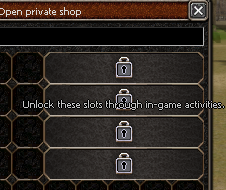
Some locked shop slots can be unlocked using a Wooden Key, while others require an active VIP package.
Ways to Open a Shop
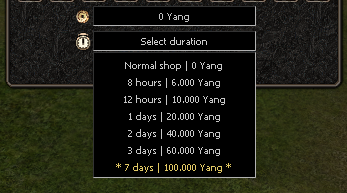
A shop can be opened in two different ways:
Standard: The shop is created next to your character using a Bundle. During this time, your character remains inactive and functions as the shop.
Offline: The shop operates independently of your login status. Your character can log out or continue participating in other in-game activities. However, this service is paid and the cost depends on how long the shop remains active.
Managing Your Shop
After an item is sold, you will receive information about which item has been purchased. The earned Yang, reduced by the sales commission, can be withdrawn by clicking the corresponding button in the inventory.
The shop also includes an option to remember the item layout, for example if another player kills your character.
Finding Your Shop
If you are unable to locate your shop, the “Find Shop” option can help. It highlights the location on the map where the shop was opened.
Reopening Your Shop
After closing a shop, you can reopen it while keeping the same item layout as before.
Oprócz ziół, na naszej drodze po krainach możemy napotkać również skrzynie. Są one kolejnym elementem, który może przyczynić się do lepszego zarobku dla szczęśliwca, który taką odnajdzie
Opis systemu
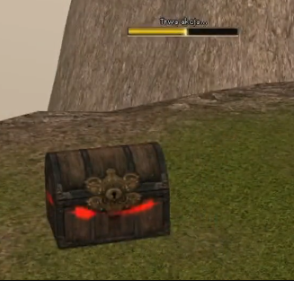
Otwieranie skrzynek nie jest takie proste, gdy się ją już odnajdzie gracz musi być czujny ponieważ póki nie skończy się proces otwierania nie otrzyma się dropu.
W każdej chwili napotkać można agresywne potwory lub graczy którzy mogą przejąć całą zawartość. Skrzynie rozsiane są po większości map na serwerze, skrzynie roztawione na najwyższych mapach posiadaja najatrakcyjniejszy drop ale nie znaczy to ze powinno omijać się te spotkane na pierwszych mapach.
Otwieranie skrzynek
Niezbędnym przedmiotem do otwierania skrzynek jest Wytrych 
Więcej informacji o tym, jak wytworzyć owy item, znajdziesz w zakładce Niepokaźny Pieszy.
In addition to herbs, while travelling across the lands, we may also come across chests. They are another feature that can bring extra profit to the lucky player who manages to find one.
System Description
Opening chests is not as easy as it may seem. Once a chest is found, the player must remain alert, because no loot will be obtained until the opening process is fully completed.
At any moment, aggressive monsters or other players may appear and take over the entire contents. Chests are scattered across most maps on the server. Those placed on the highest-level maps contain the most attractive loot, but that does not mean the ones found on earlier maps should be ignored.
Opening Chests
The essential item required to open chests is the Lockpick
More information about how to craft this item can be found in the Shabby Pederastian.
Wierzchowiec wzmacnia statystyki, które wspomagają walkę i zwiększają mobilność. Mimo iż nie da się doprowadzić konia do śmierci, bardzo ważne jest, aby go karmić, gdyż przekłada się to na wytrzymałość konia oraz możliwość używania sprintu.
Konie można karmić w zależności od ich rodzaju:


Podkowa
Żelazna podkowa – nowy element ekwipunku konia, aktualnie w grze znajduje się jedna wersja podkowy.
- Na +9 daje +30 wartości ataku.
- Działa tylko podczas jazdy konno.
- Podkowa nie może mieć bonusów 1–5.
Wymagania poziomowe konia do zakładania/ulepszania:
+0 – można założyć od 20 poziomu konia.
+5 – wymaga już 30 poziomu konia.
Można zdobyć z Lord Małp.
Juki konne
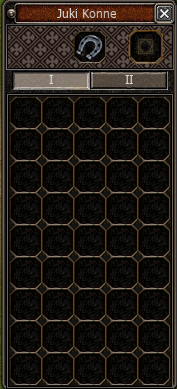
Juki to specjalne sakwy, które możesz zamontować na swoim koniu. Dzięki nim będziesz mógł przenosić więcej przedmiotów w trakcie swoich podróży. Bez nich twój koń nie pokaże pełni swoich możliwości!
Aby wytworzyć sakwę należy udać się do Stajennego
Do wytworzenia potrzebujemy konkretne przedmioty, ilość wymaganych przedmiotów zmienia się razem z kolejno odblokowanymi slotami w jukach, które rozszerzają się wraz z poziomem konia.


Ulepszanie konia
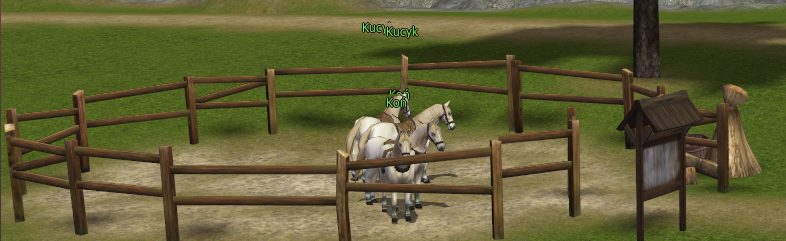
Konia i umiejętności jeździeckie zdobywasz przez misje konne, aktywowane u Stajennego za pomocą Medalu Konnego.
- Medal Konny można teraz używać prawym przyciskiem myszy
- Poziomy konia 2–10: 1 Medal, 80% szansy
- Poziomy konia 12–20: 2 Medale, 70% szansy,
- Poziomy konia 22–30: 3 Medale, 50% szansy.
- Misje specjalne na 1,11 i 21 poziom konia pozostają bez zmian.
Cooldown wynosi 30 minut i jest nakładany wyłącznie po udanej próbie.
Po nieudanej próbie Medale zostają pobrane, ale można od razu spróbować ponownie. Cooldown nie znika po wylogowaniu, zmianie kanału ani restarcie serwera.
Maksymalny poziom konia wynosi 30.
Your horse improves combat-related stats while also increasing your mobility. Although your horse cannot die, it is still very important to keep it well fed, as this affects its stamina and the ability to use Sprint.
Horses require different types of food depending on their tier:
Horseshoe
Iron Horseshoe – a new piece of horse equipment. Currently, only one type of Horseshoe is available in the game.
At +9, it provides +30 Attack Value.
The bonus is active only while riding your horse.
The Horseshoe cannot receive 1–5 bonuses.
Horse level requirements for equipping and upgrading:
+0 – can be equipped from Horse Level 20.
+5 – requires Horse Level 30.
Can be obtained from the Ape Lord.
Horse Saddlebags
Horse Saddlebags are special bags that can be equipped on your horse. They provide additional inventory space, allowing you to carry more items during your adventures.
To craft a Saddlebag, visit the Stable Boy.
Crafting requires specific materials. The amount of materials required increases as you unlock additional Saddlebag slots.
New slots become available as your Horse Level increases.
Horse Training
Your horse and riding skills are developed through Horse Missions, which can be started at the Stable Boy using a Horse Medal.
Horse Medals can now be used directly with the right mouse button.
Horse Levels 2–10 require 1 Horse Medal and have an 80% success rate.
Horse Levels 12–20 require 2 Horse Medals and have a 70% success rate.
Horse Levels 22–30 require 3 Horse Medals and have a 50% success rate.
The special missions at Horse Levels 1, 11 and 21 remain unchanged.
The cooldown is 30 minutes and is applied only after a successful attempt.
After a failed attempt, the Horse Medals are consumed, but you can immediately try again.
The cooldown remains active after logging out, changing channels or restarting the server.
The maximum Horse Level is 30.
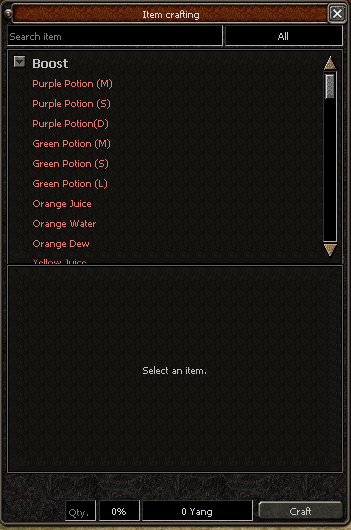
 U Heuk-Younga dostępny jest specjalny system craftingu pozwalający samodzielnie tworzyć przedmioty potrzebne do rozwijania ekwipunku
Materiały potrzebne do craftingu można zdobywać podczas normalnej rozgrywki
Zaczarowanie Przedmiotu
Do wytworzenia potrzebne są
1x Zezwolenie na Zaczarowanie
1x Zaklęty Diament
1x Pergamin
Zaczarowanie Przedmiotu pozwala ponownie losować dodatkowe bonusy znajdujące się na przedmiocie
Wzmocnienie Przedmiotu
Do wytworzenia potrzebne są
1x Zezwolenie na Wzmocnienie
2x Zaklęty Diament
2x Pergamin
Wzmocnienie Przedmiotu pozwala dodawać kolejne bonusy do ekwipunku
Piąty Bonus
Do dodania piątego bonusu potrzebny jest Marmur Błogosławieństwa
Marmur Błogosławieństwa można wytworzyć u Heuk-Younga wykorzystując
2x Wzmocnienie Przedmiotu
Zaklęty Diament
Zaklęty Diament jest jednym z głównych materiałów wykorzystywanych podczas craftingu
Można go zdobyć poprzez
Wytworzenie z 10x Magicznego Pyłu
Drop z Kamieni Metin
Dzięki temu rozwijanie ekwipunku jest bezpośrednio powiązane z aktywną rozgrywką i niszczeniem Metinów
A special crafting system is available at Heuk-Young allowing players to create items required for equipment progression
The materials required for crafting can be obtained through regular gameplay
Item Enchantment
Required materials
1x Item Enchantment Permit
1x Enchanted Jewel
1x Parchment
Item Enchantment allows you to reroll the additional bonuses on your equipment
Item Enhancement
Required materials
1x Item Enhancement Permit
2x Enchanted Jewel
2x Parchment
Item Enhancement allows you to add additional bonuses to your equipment
Fifth Bonus
To add the fifth bonus you need a Blessing Marble
The Blessing Marble can be crafted at Heuk-Young using
2x Item Enhancement
Enchanted Jewel
The Enchanted Jewel is one of the main materials used in the crafting system
It can be obtained by
Crafting it from 10x Magic Dust
Dropping it directly from Metin Stones
This makes equipment progression directly connected to active gameplay and destroying Metin Stones
System stworzony dla każdego gracza – idealny zwłaszcza dla osób, które nie mają wiele czasu w ciągu dnia. Dzięki niemu można zdobywać spore profity, co pozwala na delikatny, ale stały progres w grze.
Dostępne frakcje
Królewska Gwardia
Jej przedstawiciel wita każdego gracza wchodzącego do Doliny Orków. Zadania od tej frakcji głównie polegają na pokonywaniu potworów dostępnych na mapie. Dostępna jest także dzienna misja za której wykonanie można otrzymać 3-godzinny bonus +5% Silny na Potwory i +10% Dodatkowego łupu, działający wyłącznie na Dolinie.
Misję można wykonać raz dziennie.
Synowie Pustyni
Ich misje są bardziej zróżnicowane i obejmują zbieranie roślin, żył lub rud, a także pokonywanie potworów i metinów. Od 40 poziomu w frakcji odblokowywana jest dodatkowa misja u Amala. Dostępna jest także dzienna misja za której wykonanie można otrzymać 3-godzinny bonus +5% Silny na Potwory i +10% Dodatkowego łupu, działający wyłącznie na Pustyni.
Misję można wykonać raz dziennie.
A system designed for every player — especially for those who do not have much time to play during the day. It allows you to earn valuable rewards and make small but steady progress throughout the game.
Available Factions
Royal Guard
A representative of the Royal Guard welcomes every player entering the Orc Valley. Missions from this faction mainly focus on defeating monsters found throughout the map.
A daily mission is also available, rewarding the player with a 3-hour bonus of +5% Strong against Monsters and +10% Additional Drop, which works exclusively in the Orc Valley.
The mission can be completed once per day.
Sons of the Desert
Their missions are more varied and include gathe
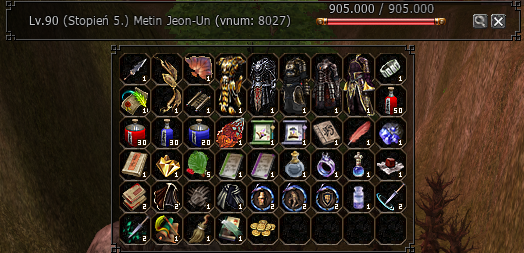
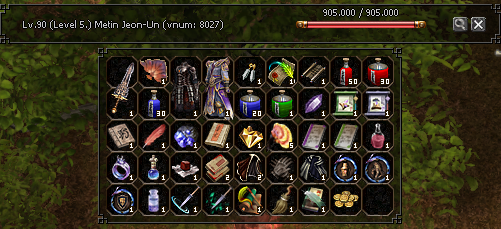
Podglą Dropu
Możliwość podglądu zawartości dropu z danego moba.
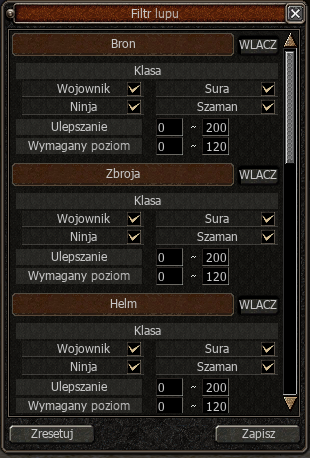
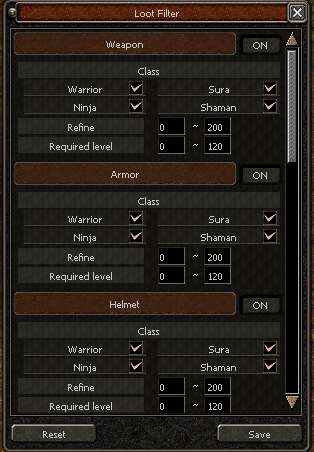
Filtr Dropu
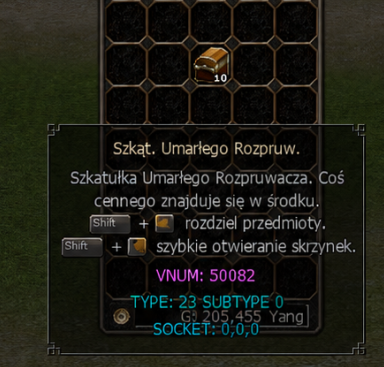
Szybkie otwieranie skrzynek
Mały, ale bardzo przyjemny Quality of Life do gry dodaliśmy Shift + PPM do szybkiego otwierania szkatułek.
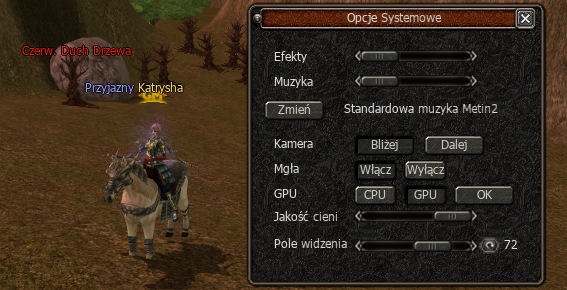
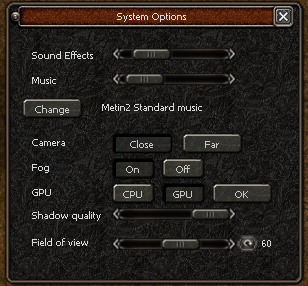
Powiększone pole widzenia (FoV)
Wyjątkowe Ulepszenie
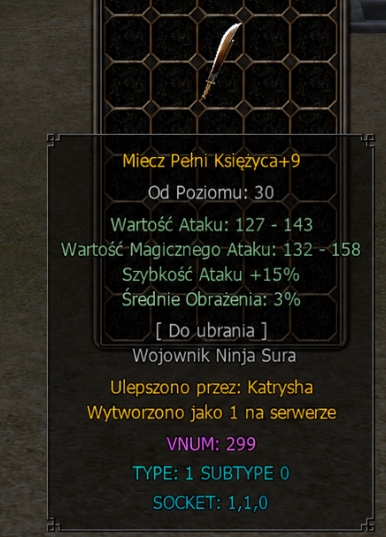
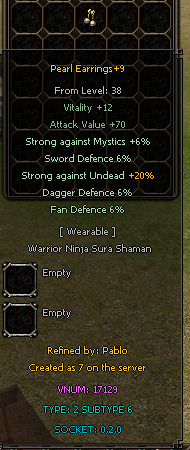
Od teraz przedmioty ulepszone na najwyższy poziom będą zapamiętywać, kto je wytworzył. W opisie itemu pojawi się informacja „Ulepszono przez: nick”, więc najlepsze przedmioty będą miały swoją historię i autora.
Ranking Tygodniowy
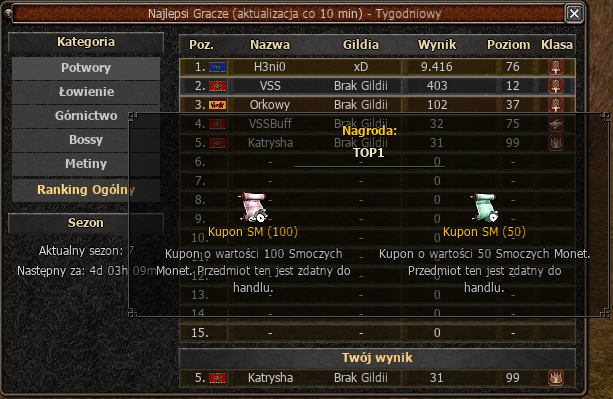
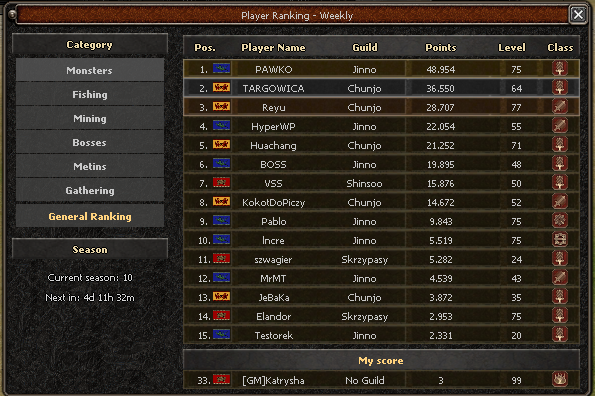
Na serwerze pojawił się ranking tygodniowy, w którym możecie rywalizować w kilku kategoriach: zabite potwory, bossy, metiny oraz łowienie. Ranking odświeża się co 10 minut, a aktualny wynik możecie sprawdzić bezpośrednio w oknie rankingu. Na dole widoczna jest również sekcja „Twój wynik”, gdzie zobaczycie swoją pozycję, nick, gildię, poziom, klasę oraz zdobyty wynik w wybranej kategorii. Nagrody dla najlepszych graczy są rozdawane automatycznie w każdą niedzielę o 23:59. Po rozdaniu nagród rozpoczyna się nowy sezon rankingu.
Codzienne Nagrody
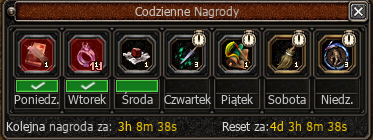
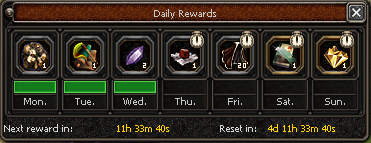
Na serwerze pojawił się system Codziennych Nagród! Od teraz każdego dnia możecie odebrać darmową nagrodę prosto z okna gry. Nagrody losują się na cały tydzień i resetują w każdy poniedziałek, więc warto zaglądać regularnie. System dostępny jest od 50 poziomu.
Blokada Doświadczenia
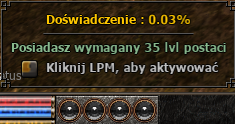
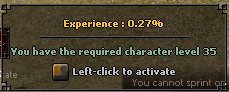
Dodałem system blokady EXP, który pozwala zatrzymać zdobywanie doświadczenia po osiągnięciu wymaganego poziomu.
• aktywacja i wyłączenie przez kliknięcie kulek EXP
• wymagany 35 poziom postaci
• informacja o wymaganiu poziomu zmienia kolor na zielony/czerwony Idealne dla graczy, którzy chcą zatrzymać postać na konkretnym poziomie i spokojnie rozwijać ekwipunek.
System Teleportacji
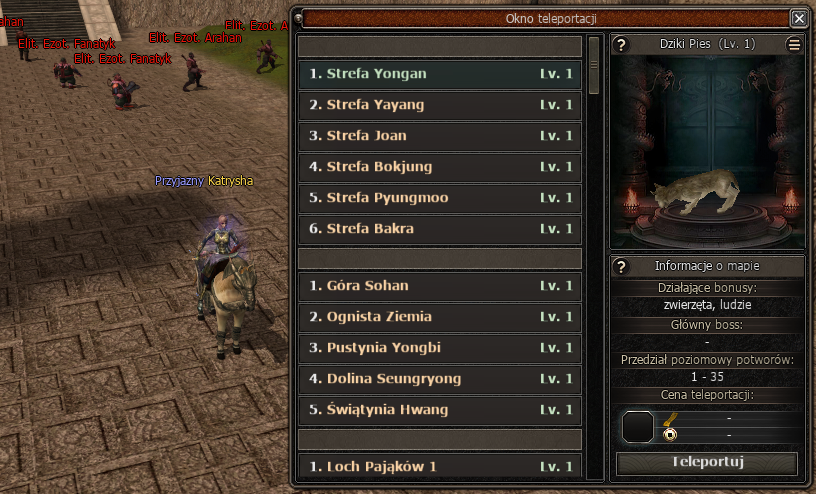
Do gry trafi nowe okno teleportacji, które ułatwi szybkie przemieszczanie się pomiędzy najważniejszymi lokacjami.
• wygodny podział map na kategorie
• podgląd wybranej lokacji w oknie teleportacji
• informacje o potworach, metinach i bossach dostępnych na mapie • widoczne wymagania poziomu oraz koszt teleportacji
• szybkie otwieranie systemu klawiszem TAB System został przygotowany tak, aby gracz przed teleportem od razu wiedział, gdzie idzie i czego może się tam spodziewać.
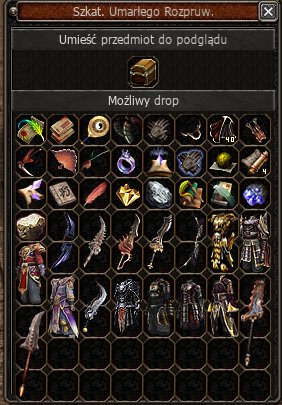
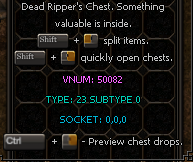
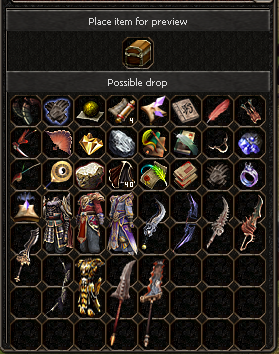
Podgląd dropu skrzyń
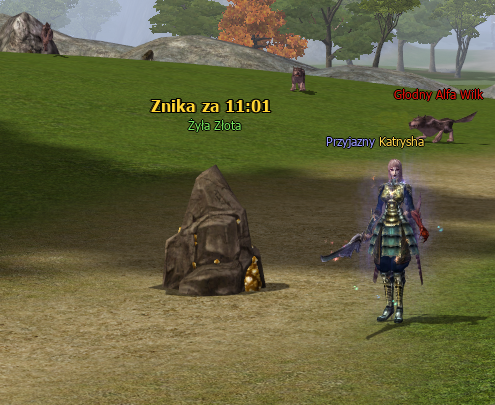
Czas nad rudami
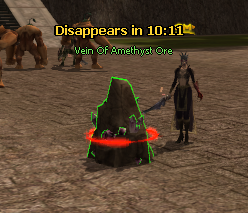
Dodano timer nad rudami pokazujący czas do ich zniknięcia. Timer startuje od momentu spawnu rudy, a nie dopiero od rozpoczęcia kopania. Napis nad rudą jest pogrubiony/wyraźniejszy, żeby dobrze było go widać w grze. Tekst działa w dwóch językach: PL: Znika za MM:SS EN: Disappears in MM:SS
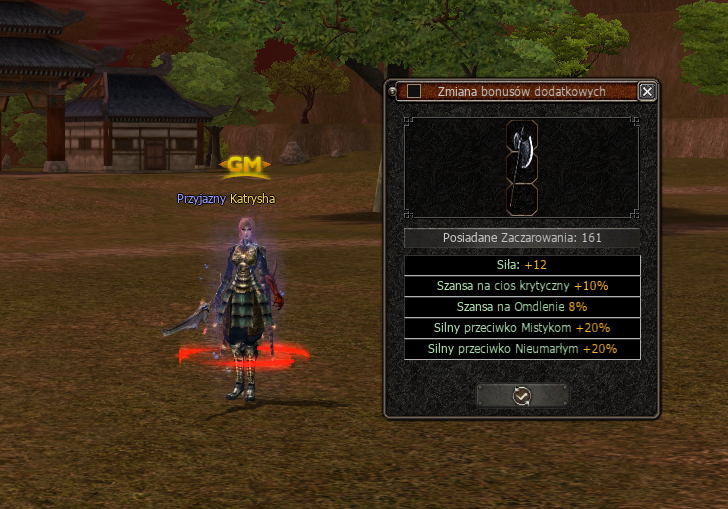
Zmiana bonusów dodatkowych
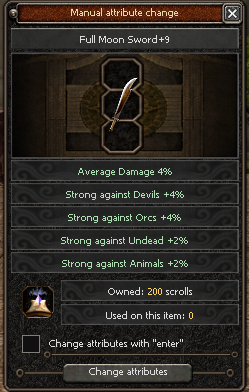
Dodany został system ręcznej zmiany bonusów. Po użyciu Zaczarowania Przedmiotu otworzy się nowe okno, w którym podejrzycie bonusy przedmiotu, zobaczycie wyróżnione maksymalne wartości i szybko ocenicie efekt losowania. Dodatkowo będzie można zaznaczyć tryb Enter, aby zmieniać bonusy klawiszem Enter bez ciągłego klikania. System dotyczy tylko zmiany bonusów. Wzmocnienie Przedmiotu działa standardow
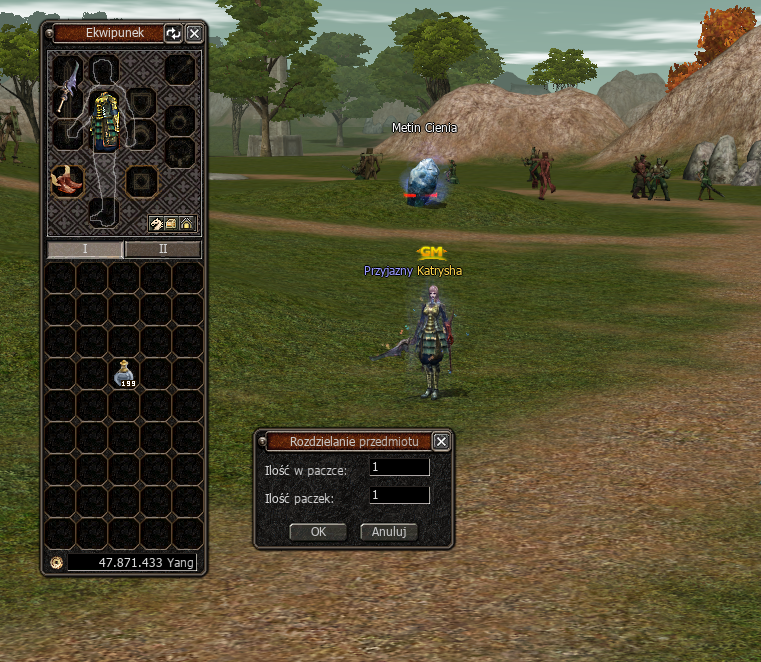
System rozdzielania przedmiotów
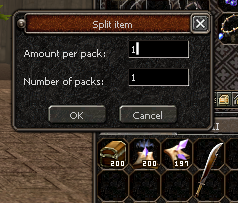
Dodany został nowy system rozdzielania stacków przedmiotów. Od teraz przy Shift + PPM na przedmiot stackowalny pojawia się nowe okno, w którym można ustawić nie tylko ilość przedmiotów w jednej paczce, ale też liczbę paczek. Przykład: Mając 200 sztuk przedmiotu, można od razu rozdzielić je na 20 paczek po 10 sztuk, zamiast klikać wszystko ręcznie po jednej paczce. Domyślnie okno ustawia 1 paczkę po 1 sztuce, więc stare rozdzielanie pojedynczego przedmiotu nadal działa normalnie.
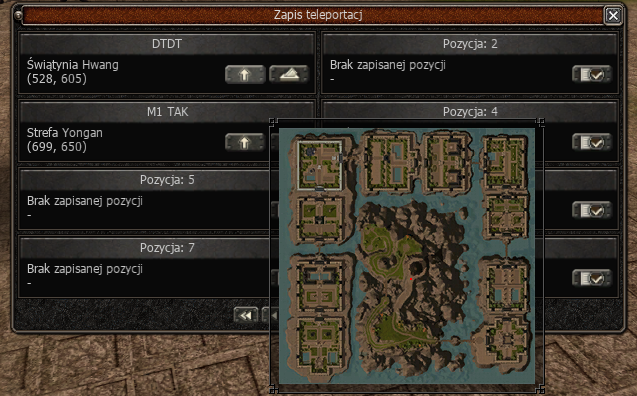
Zapis Teleportacji
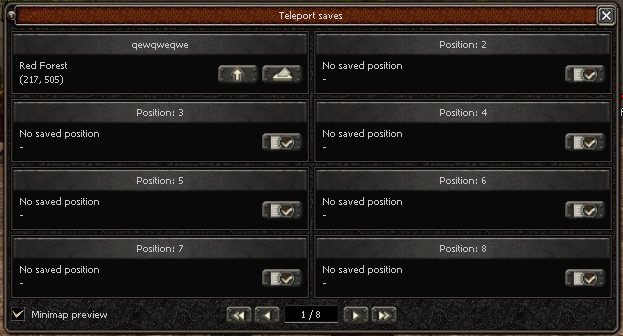
Dodano nowe okno zapisywania pozycji, otwierane klawiszem P. Można zapisać własną nazwę oraz współrzędne lokalizacji. Dodano podgląd mapy zapisanej pozycji.
Drop Preview
Allows you to preview the possible drops from a selected monster.
Drop Filter
Quick Chest Opening
A small but very convenient Quality of Life feature has been added to the game.
You can now use Shift + Right Click to quickly open chests and boxes.
Increased Field of View (FoV)
Unique Upgrade Signature
From now on, items upgraded to their maximum level will remember who created them.
The item description will display the information:
“Upgraded by: nickname”
This means that the best items on the server can now carry their own history and the name of the player who created them.
Weekly Ranking
A Weekly Ranking system is available on the server, allowing players to compete in several categories:
Monsters killed
Bosses defeated
Metin Stones destroyed
Fishing
The ranking is updated every 10 minutes, and the current standings can be checked directly in the ranking window.
At the bottom of the window, you will also find the “Your Result” section, where you can view your position, nickname, guild, level, class and score in the selected category.
Rewards for the best players are distributed automatically every Sunday at 23:59.
Once the rewards are distributed, a new ranking season begins.
Daily Rewards
The server features a Daily Rewards System!
From now on, every day you can claim a free reward directly from the game window.
Rewards are generated for the entire week and reset every Monday, so it is worth checking the system regularly.
The system becomes available from level 50.
Experience Lock
An EXP Lock system has been added, allowing players to stop gaining experience after reaching the required level.
Enable or disable the system by clicking the EXP orbs
Requires character level 35
The level requirement indicator changes between green and red depending on whether the requirement is met
This feature is perfect for players who want to keep their character at a specific level while focusing on improving their equipment.
Teleportation System
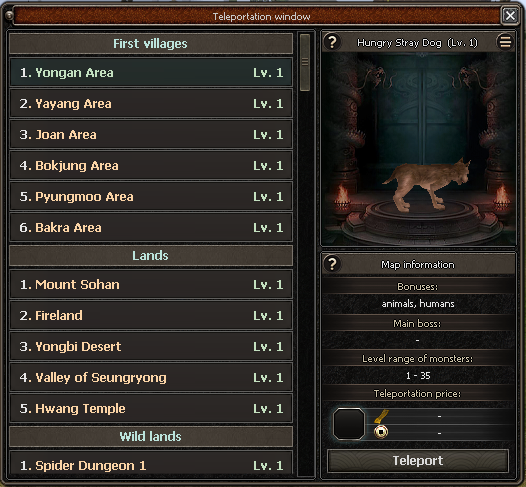
A new teleportation window has been added to make travelling between the most important locations much easier.
Maps are conveniently divided into categories
Preview of the selected location
nformation about monsters, Metin Stones and bosses available on the map
Visible level requirements and teleportation cost
-
Quick access to the system with the TAB key
The system has been designed so that before teleporting, the player immediately knows where they are going and what they can expect to find there.
Chest Drop Preview

Ore Timer
A timer has been added above ores, displaying the time remaining until they disappear.
The timer starts from the moment the ore spawns, rather than from the moment mining begins.
The text above the ore is bold and more visible, making it easy to read during gameplay.
The feature supports both languages:
PL: Znika za MM:SS
EN: Disappears in MM:SS
Additional Bonus Reroll System
A manual bonus reroll system has been added.
After using Enchant Item, a new window will open where you can:
Preview the current bonuses of the item
See maximum bonus values clearly highlighted
Quickly evaluate the result of each reroll
You can also enable Enter Mode, allowing you to reroll bonuses using the Enter key instead of repeatedly clicking.
This system applies only to changing bonuses.
Reinforce Item continues to work in the standard way.
Item Stack Splitting System
A new item stack splitting system has been added.
From now on, using Shift + Right Click on a stackable item opens a new window where you can select not only the amount of items per stack, but also the number of stacks to create.
For example:
If you have 200 items, you can instantly split them into 20 stacks of 10, instead of creating each stack manually.
By default, the window is set to 1 stack of 1 item, so the traditional method of splitting a single item still works as before.
Saved Teleport Locations
A new position-saving window has been added and can be opened using the P key.
You can save:
Your own location name
The coordinates of the location
A map preview of the saved position